Google Takeout Viewer & ReaderRead your Google Takeout in plain English
Download your Google Takeout
Go to Google Takeout and export your data as a ZIP file. Google will email you when it's ready.
Drop your ZIP file here
Drag & drop your file here, or click to browse
Why people trust TakeoutReader
We do not collect your data. We do not even see it. Here is exactly what you get for $9.
Your file never leaves your browser
Parsing happens entirely on your device. Open the network tab and check: there is no upload endpoint. We physically cannot see your data.
Works offline once loaded
Disconnect your wifi after the page loads. Your report still generates. That is what private really means.
$9 once. No subscription.
One payment, full report, forever. No trial that auto-renews. No account to cancel. No credit card stored on file.
Export to PDF, CSV, Markdown or text
Keep a copy in whatever format works for you. Share it, archive it, dig into it with a spreadsheet.
How to Read Your Google Takeout
Upload ZIP
Drop your Google Takeout file
Auto-Analyze
We parse the JSON locally
Get Report
Download as PDF or text
What Google Data Can You View?
TakeoutReader analyzes your Google Takeout and shows you exactly what data Google has collected about you
Private
Location History
See every place Google tracked. Countries, cities, and your most active years of location data.
Search Activity
View your total Google searches, most active periods, and search types over the years.
Your Inferred Ad Profile
The one category that is not a log of what you did. It is what Google concluded about you from it: your estimated age range, gender, parental and marital status, income bracket, and every interest segment advertisers can buy you through.
Sample data from a fictional account
Your Photo Library
Every picture carries the moment it was taken and, if location was on, the coordinates. See how many frames you have, which years you shot most, the places you kept coming back to, and how many faces Google put a name to.
Sample data from a fictional account
Zero Upload Architecture
Your data never leaves your device. Everything is processed in your browser using JavaScript. No server, no cloud.
Export in Any Format
Download your readable report as PDF, plain text, Markdown, or CSV for spreadsheet analysis.
See what your report looks like
Thirty seconds, from the raw JSON Google hands you to the finished report. Every figure shown is from a real export.
This is what your full report looks like
Sample data from a 10-year Google account. Yours will be just as detailed, and 100% private.
No signup. No upload. Free preview, $9 for the full report.
Why Can't I Read My Google Takeout Files?
When you download your data from Google Takeout, you receive a ZIP file containing hundreds of folders and JSON files. These files are formatted for machines, not humans, with timestamps as milliseconds, coordinates as raw numbers, and complex nested data structures. If you are new to all this, start with what is Google Takeout and how to open Google Takeout files.
TakeoutReader solves this problem by automatically parsing your Google Takeout export and converting it into a clear, readable report. No coding skills required. No technical knowledge needed. Just upload your ZIP file and get instant insights into what Google knows about you.
Timeline Reader: your Google Maps history on a map
A Maps Timeline export is a different file from the rest of your Takeout, and it deserves more than a summary. Drop it in and see every place you stopped and every journey you made, drawn on a map. Then turn it into a mileage log for your records, a print for your wall, or GPX, KML and GeoJSON.
- Reads Timeline.json, Records.json, monthly files, CSV, or the whole ZIP
- Map, statistics and a mileage preview, free
- Runs in your browser, like everything else here
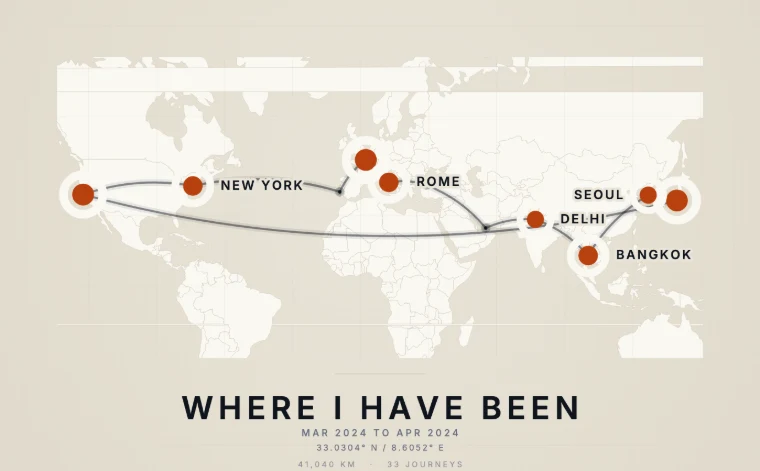
A real export, drawn by the tool
Google Takeout Guides
Everything you need to export, open, and understand your Google data.
What Is Google Takeout?
The free export tool, explained in plain English.
How Does It Work?
What happens when you request an export.
Google Takeout Instructions
Step-by-step guide to export your data.
How to Open Takeout Files
Unzip and read the JSON, HTML, and MBOX files.
How Long Does It Take?
Export times, from minutes to hours.
File Size & Multiple ZIPs
Why big exports split into numbered ZIP files.
Takeout Not Working?
Fixes for stuck exports and download errors.
Is Google Takeout Free?
Yes, and here is the fine print on costs.
Is Google Takeout Safe?
How to handle your export securely.
Does It Delete My Data?
No. Export copies, it never erases the originals.
What Does Google Know About Me?
See the real numbers from a 10-year account.
Location History Viewer
Read your Google Maps timeline data.
Takeout JSON Viewer
Make sense of the raw JSON files.
Google Activity Viewer
Every supported data category in one place.
Frequently Asked Questions About Google Takeout
Upload your Google Takeout ZIP file to TakeoutReader. The tool parses the JSON files locally in your browser, typically in under 60 seconds for a 10-year export, and converts them into a readable report covering location history, search activity, YouTube watch history, Chrome browsing, Android app usage, and Gmail stats.
Yes. TakeoutReader uses a zero-upload architecture. Your ZIP file is parsed by JavaScript running inside your browser (via the JSZip library) and never touches any server. You can verify this by opening your browser DevTools Network tab while the report generates. No HTTP request containing your data leaves your device.
Go to takeout.google.com, sign in with your Google account, pick the data categories you want to export (Location History, Search Activity, YouTube, Chrome, etc.), choose ZIP format, and click Create export. Google emails you a download link when the archive is ready, usually within a few hours depending on data size.
Google Takeout exports data in JSON format, which is designed for machines, not humans. According to Google's own documentation, timestamps are stored as Unix epoch milliseconds, coordinates are raw E7-encoded integers, and related records are scattered across nested files. TakeoutReader converts this machine format into plain English summaries with counts, dates, and top entries.
Google splits large exports into 2 GB archives. You can upload any individual ZIP and TakeoutReader will analyze whatever categories are inside that specific file. For a complete report across all categories, process each archive separately and combine the results.
TakeoutReader analyzes eight Google data categories: your Ad Profile (the age range, status and interest segments Google infers about you), Google Photos (how many pictures, spread over which years, and where they were taken), Location History (countries, cities, most active years), Search Activity (total queries and patterns), YouTube watch history (videos watched, likes, comments), Chrome browsing (top sites and page visits), Android app activity (apps used, frequency), and Gmail (total message count). More Google services are added regularly.
Yes. The Ad Profile section shows the inferred profile Google built about you: your estimated age range, gender, language, parental and marital status, household income bracket, and the full list of interest segments advertisers can target you with. It also lists the advertisers holding your details. This is the only category that reflects what Google concluded about you rather than what you did. To include it, tick My Ad Center when you create your Takeout export.
Yes. After unlocking the full report for $9, you can download it in four formats: PDF for sharing and printing, plain text for archiving, Markdown for documentation, and CSV for spreadsheet analysis in Excel or Google Sheets.
Yes. TakeoutReader runs on any modern browser including Chrome, Firefox, Safari, and Edge, on desktop, tablet, or mobile. For Google Takeout archives larger than 2 GB, a desktop computer is recommended because mobile browsers limit in-memory processing.
It depends on your Google account settings. Google Location History started in 2014, so exports typically cover 10+ years of location data. Search history and YouTube watch history can go back to 2005 or earlier on older accounts, provided activity tracking was enabled in My Activity settings.
Ready to see what Google has on you?
Drop your Takeout ZIP and get a free preview in 60 seconds. Or peek at the sample first.
100% private · No signup · $19 $9